Data Acquisition#
Recording consists of running the actuator through a set of predefined trajectories while logging position, velocity, and control signals. The trajectories are played with different P-gain values and with each mass/length combination. The resulting data is then processed to a fixed timestep and stored in a structured format for later use in the identification pipeline.
Installation#
First, you need to clone the BAM repository.
Then, install the extra dependencies for the identification pipeline using
uv (installation instructions):
uv sync --extra identification
Trajectories#
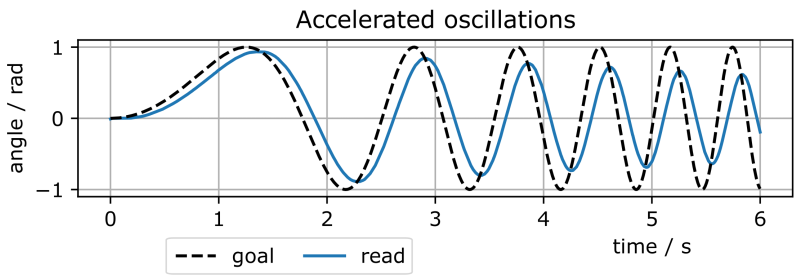
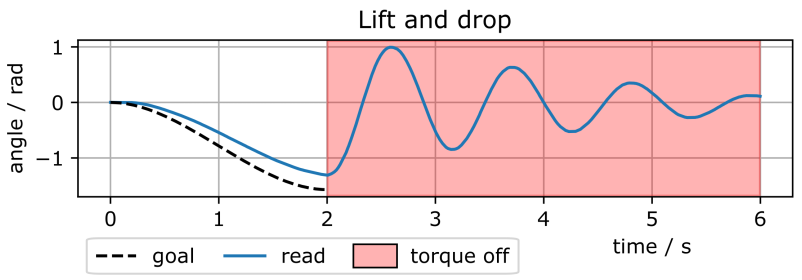
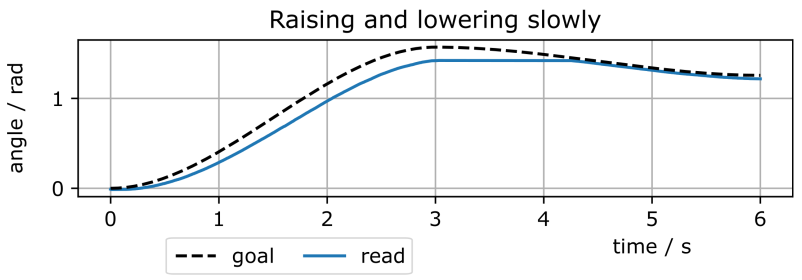
The trajectories are designed to excite different friction regimes. Each trajectory runs for 6 seconds.
Name |
Description |
|---|---|
|
\(\sin(t^2)\) profile — progressively faster oscillations, good general-purpose trajectory that covers a wide velocity range.
|
|
Cubic move to −π/2 over 2 s, then torque disabled — the arm falls under gravity. Particularly useful for identifying backdrivability and Stribeck effects at very low speed.
|
|
Cubic path 0 → π/2 → 0.8·π/2 — slower motion, emphasizes static friction and load-dependent effects.
|
|
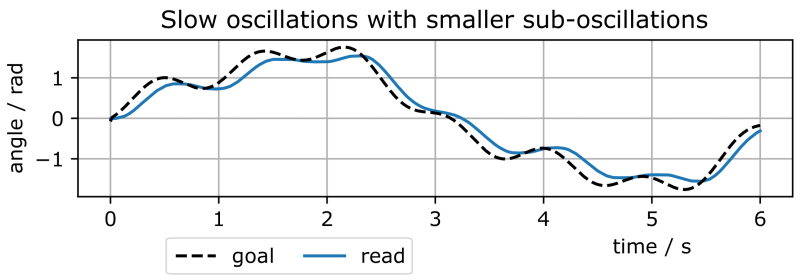
\(\sin(t)\cdot\pi/2 + \sin(5t)\cdot 0.5\cdot\sin(2t)\) — rich multi-frequency content.
|
Recording#
BAM already ships with support for several actuators (the ones whose models
are provided in the library), and is designed to be extended with new ones.
Each manufacturer is implemented in its own package under
bam/<manufacturer>/, exposing the same small interface. To record your own
actuator, you therefore either:
extend an existing manufacturer package if your motor’s brand is already supported — simply add your actuator class (for example a new Dynamixel model in
bam/dynamixel/); orcreate a new
bam/<manufacturer>/package if your manufacturer is not supported yet.
Each manufacturer package is made of three modules:
actuator.py— the only hardware-specific part. It handles the communication with the motor: reading position, speed and load, and sending position or current commands. Your actuator class subclasses the base classes provided inbam.actuator.record.py— plays the trajectories on the motor and logs the resulting data to JSON. It adapts the generic trajectories to the motor when needed (for instance, scaling the velocity to stay within the actuator’s limits).all_record.py— a convenience script that runs a full recording session for a given mass/arm configuration, automatically sweeping over all the P-gain values.
When writing your own package, the existing bam/dynamixel/ implementation
is a good reference to draw inspiration from.
Once these modules are written, recording should be done using the following command:
uv run python -m bam.<manufacturer>.all_record \
    --port /dev/ttyUSB0 \
    --motor motor_name \
    --mass 0.5 \
    --arm-mass 0.02 \
    --length 0.15 \
    --vin 7.5 \
    --logdir data_raw
with each length/mass combination. Don’t forget to update the mass, length, and arm mass parameters for each recording.
Warning
The P-gain values used in the <manufacturer>/record.py file are
manufacturer-specific and must be adapted to your motor based on the
manufacturer’s specifications: a gain that is meaningful for one firmware
may be far too high or too low for another.
To determine the appropriate P-gain values for your actuator, you can
take the default P-gain value kp given by the manufacturer and test
[kp/6, kp/4, kp/2, kp].
Raw data format#
Each recording produces one JSON file:
{
  "mass": 0.5,
  "arm_mass": 0.02,
  "length": 0.15,
  "kp": 50,
  "vin": 7.5,
  "motor": "motor_name",
  "trajectory": "sin_time_square",
  "entries": [
    {
      "timestamp": 0.0077,
      "position": 0.0015,
      "speed": 0.024,
      "load": 0.0,
      "input_volts": 7.5,
      "goal_position": 0.0,
      "torque_enable": true
    },
    ...
  ]
}
Entries are logged at the firmware’s native rate, which is not necessarily constant. The processing step resamples them to a fixed timestep.
Processing#
Resample raw logs to a constant timestep before fitting:
uv run python -m bam.process \
    --raw data_raw \
    --logdir data_processed \
    --dt 0.005
--dt is the target timestep in seconds. The
script linearly interpolates between consecutive entries and writes one
processed JSON per raw file into data_processed/.
Example: Dynamixel XL-330#
The Dynamixel XL-330 is supported through the bam/dynamixel/
package. The physical test bench used for this motor is shown in
Hardware Setup.
To record a full session for a 0.567 kg weight at the tip of a 0.17 m arm weighing 0.016 kg, the following command is used:
uv run python -m bam.dynamixel.all_record \
    --port /dev/ttyUSB0 \
    --motor xl330 \
    --mass 0.567 \
    --arm-mass 0.016 \
    --length 0.17 \
    --vin 7.5 \
    --logdir data_raw
For the XL-330, all_record automatically sweeps the five P-gain values
[50, 100, 200, 300, 400] over the four trajectories, producing 20
recordings in data_raw/. By repeating the command for each mass/length
combination presented in Hardware Setup, a complete dataset of 240 6s recordings is obtained.
The video below shows the four trajectories being played on the XL-330 for a single P-gain value:
Once all sessions are recorded, the raw data are then processed into a fixed timestep as shown above.